
Example of Error Screen
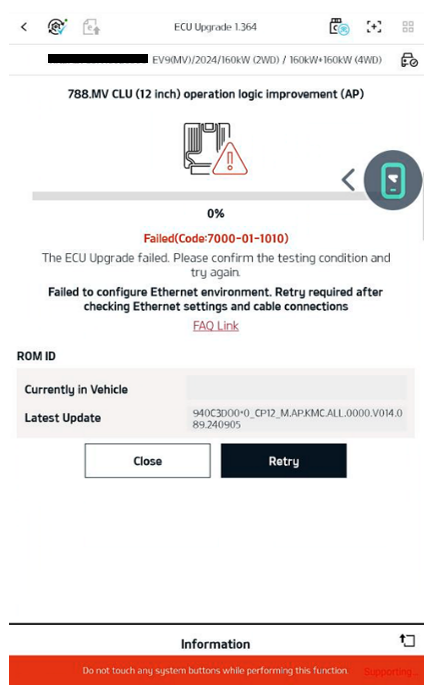
7000-01-1010 Error Inspection Checklist
- Check if the VCI module LED is blinking green.
When starting reprogramming (attempting Ethernet connection), please check if the LED of the ECI connected to the VCI blinks green. - Confirm that reprogramming was attempted with the vehicle IG ON state.
- Verify that the fixed IP setting has been completed. A correct fixed IP is required for network connection.
🔗 How to set a fixed IP - Check whether LTE/5G is disabled. (If the tablet does not support mobile data, this is "Not applicable")
※ If LTE/5G is enabled, it may affect wired Ethernet connection. Turn off LTE/5G and try again using Wi-Fi or wired connection. - Check the wired cable connection status and for any disconnection.
• When using VCI3: check USB cable connection
• When using VCI2: check ECI cable connection
Physical connection failure may be the main cause, so inspect all connectors/cables.
If you have a spare ECI, try replacing the ECI and attempt again. - Ensure Google Play system updates are up to date. (Settings > Security and Updates)
🔗 How to update Google Play system - Reboot the tablet and check if the same symptom recurs.
- Disconnect the vehicle battery (power reset), wait at least 15 minutes, and retry to see if the same symptom recurs.
- Replace with another wired cable and check if the same symptom recurs.
- Replace with another tablet and check if the same symptom recurs.
Note: When using VCI III(3), connecting the ECI connector is not required. (Only wired connection supported)
Q1. What causes the 7000-01-1010 error?
A1. The cause is network/physical connection issues or incomplete environment settings. Please check the following items in order.
- Fixed IP not set → Correct fixed IP setting required (see link above)
- LTE/5G enabled → Disable and retry wired/Wi-Fi connection
- Cable disconnection/fault or not connected → Check connection status/disconnection, test with another cable
- Google Play system not updated → Update to the latest version (see link above)
- Possible VCI device malfunction → Test by replacing with spare VCI2/VCI3
- Vehicle/power status → IG ON, retry after battery reset
- Terminal issues → Reboot tablet or test with another tablet
Q2. When using VCI 3, do I need to connect the ECI connector?
A2. No. VCI III operates normally without the ECI connector. (Only wired connection supported)
Q3. What if the error is not resolved after trying all methods?
A3. If the problem persists after performing all the above checklist items, please contact the vehicle or controller manufacturer.
Comments
0 comments
Article is closed for comments.